Turning Dumb Geometry into Smart Manufacturing Decisions
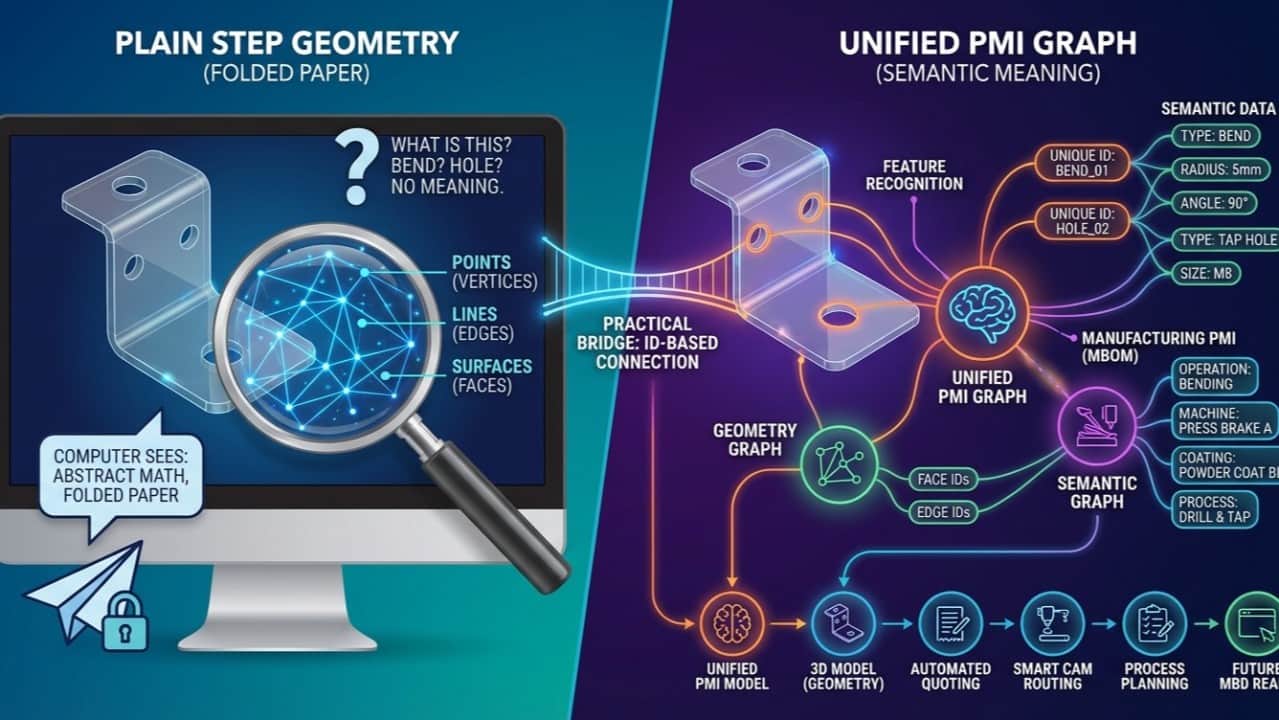
The solution to turning "dumb geometry" into smart manufacturing decisions is Unified PMI, which operates by treating 3D models as graphs (nodes and edges) where geometry is connected to semantic meaning. By modeling CAD files as graphs and linking geometric features to manufacturing attributes (material, tolerances, operations), your computer can finally understand what it's drawing and automatically make intelligent manufacturing decisions.
Most CAD models in your factory look smart. But to your computer, they're just… folded paper.
A cube, a bracket, a complex ASML part – in the old STEP formats your systems exchange every day – are nothing more than math about points, lines and surfaces. The computer can draw it, but it has no idea what it's drawing.
This article is based on the next episode of Wim’s Metaal Minuten on Unified PMI – this time zooming in on 3D geometry as a graph, and how we connect it to a practical PMI data model.
Your 3D models are graphs in disguise
In the previous article, I explained graph data models: dots (nodes) for things, lines (edges) for relationships.
3D geometry – the STEP files you use every day – is one of the most important graph-shaped data structures in your factory.
Under the hood, a 3D model is a boundary representation (“B-Rep”) built from three basic elements:
- Vertices – points in 3D space (x, y, z)
- Edges – curves connecting those points (lines, arcs, splines…)
- Faces / Surfaces – areas enclosed by edges (planar, cylindrical, conical, spherical, etc.)
If you draw a simple cube, you’re really defining:
- 8 vertices
- edges between those vertices
- faces bounded by those edges
Mathematically, that’s a graph.
And older STEP formats like AP203 basically do nothing more than exchange these definitions: points, edges, faces, with some topology around them.
To us, that might be:
- a sheet metal part
- a milled bracket
- a welded subassembly
To the computer, it’s simply: a folded sheet of abstract geometry.
It doesn’t know what a “bend”, a “hole”, or a “tap” is. It just knows about vertices, edges and surfaces.
Why this matters: your CAM and PMI don’t live in the math
This is where metalworking reality kicks in.
As a supplier, you rarely get rich, MBD-enabled models. You mostly get “plain” STEP geometry – beautiful shapes, but no explicit features, no PMI.
Yet for manufacturing you need to know:
- Where are the holes, counterbores, countersinks, tap holes?
- Where are the bends, on which side, with what radius and angle?
- What is sheet metal vs solid material?
- What belongs to which operation and machine?
None of that is directly present in the old STEP geometry. It has to be interpreted.
That’s why we need feature recognition:
- From the raw graph of vertices, edges and faces, we infer:
A single feature (like a bend) is usually represented by several geometric elements in the B-Rep:
- one or more faces
- multiple edges
- associated vertices
So the feature is not a native object in the file – it’s a bundle of geometry that we learn to recognise.
The key idea: connect features to geometry with IDs
This is where Unified PMI and graph thinking come together.
Inside Quotation Factory we:
- Take the original 3D model (plain STEP, non-MBD).
- Ensure every geometric element in the graph has a unique ID:
- Run feature recognition:
- For each feature, we store:
That means we now have traceability in both directions:
- From a feature (e.g. “this bend with radius R, angle A”) we know which faces and edges represent it in the 3D model.
- From any face or edge, we know which feature(s) it belongs to.
This is still a graph: features connected to geometry via relationships.
Because of that, we can:
- Highlight features directly in the 3D model, even though the original STEP file contained no explicit features at all
- Modify the geometry for different process steps (e.g. create flat patterns by “removing” bends)
- Keep a clean link between geometry, features, and later on operations, machines and PMI
A Unified PMI model next to, not inside, the CAD file
Now bring back Unified PMI.
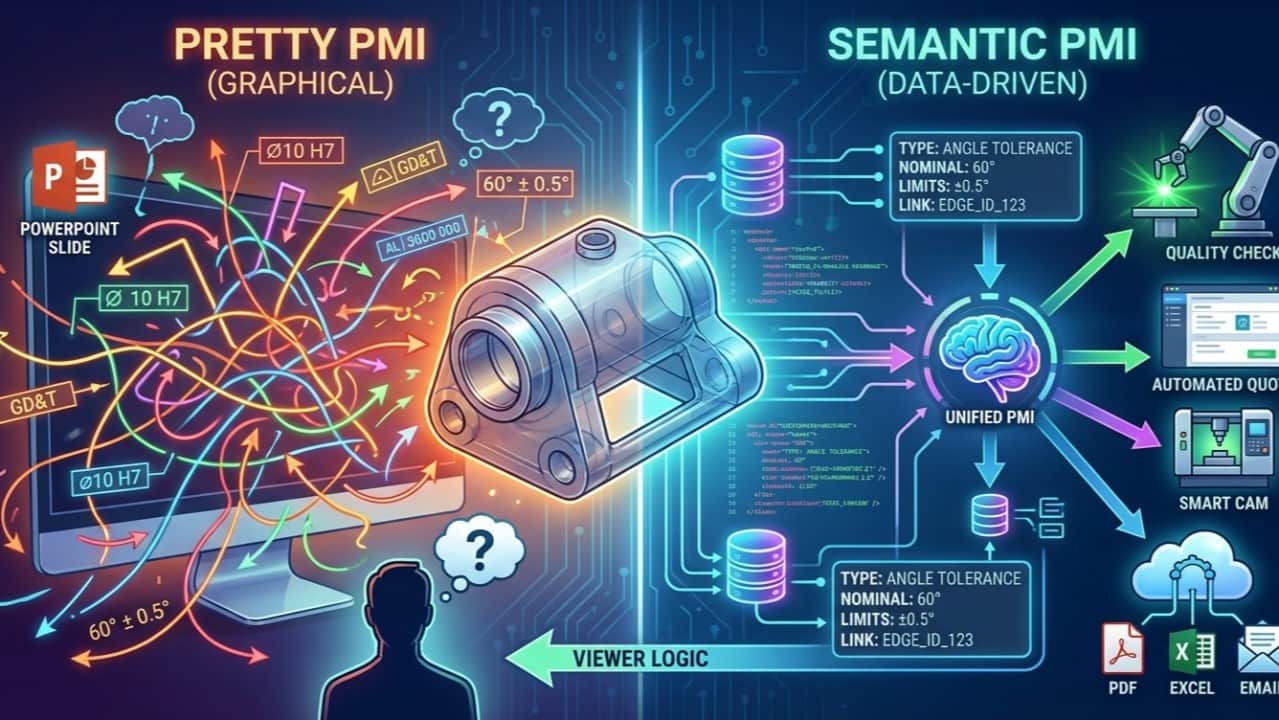
We deliberately do not pack all PMI into the 3D file itself. Instead, we build a separate, straightforward PMI data model, and link it to geometry via those IDs.
That Unified PMI model can contain:
- Feature data (type, dimensions, process requirements)
- Tolerances and fits
- Materials
- Surface treatments (coating, plating, galvanising, etc.)
- Additional manufacturing information that often doesn’t fit nicely into current MBD standards
We combine:
- 3D model (geometry graph) – readable by almost any CAD/CAM system
- Unified PMI model (semantic graph) – readable by Quotation Factory and other systems that care about meaning
The link between the two is simply: ID references from PMI entries to geometric elements and features.
This gives you best of both worlds:
- You can still work with standard STEP files that your CAM systems understand.
- You get a clean, semantic PMI layer for automation, routing, quoting and quality.
- Where needed, we can even generate MBD-style STEP files from Unified PMI – even if the original input wasn’t MBD at all.
Why not just rely on existing MBD standards?
MBD and PMI standards have been around for 30+ years. Why build something on top?
Two reasons:
- Legacy & adoption Most supply chains still exchange old-style STEP without semantic PMI. Waiting for everyone to adopt full MBD is not realistic.
- Practical limits of the standards The PMI data models in current standards are very powerful – and very abstract. Yes, you can probably encode almost anything: coating specs, special treatments, process notes. But if nobody in the chain knows how to interpret those generic constructs, you haven’t solved the problem.
Unified PMI focuses on:
- Capturing the meaning manufacturers actually need
- Keeping it straightforward and usable for routing, costing and planning
- Staying inspired by the STEP EXPRESS definitions, but not constrained by them
We adopt the MBD goal, not blindly the MBD file format.
From EBOM to MBOM: a richer PMI world
Finally, remember there are really two PMI worlds:
- Engineering side (EBOM) Focused on product definition. PMI is mainly about the final product: geometry, tolerances, fits, maybe some process hints.
- Manufacturing side (MBOM) Focused on how to make it. You add:
Unified PMI recognises that manufacturing PMI is richer and grows during the EBOM → MBOM transformation.
By modelling both the geometry graph and the process/feature graph, then tying everything together via IDs, we get:
- A stable, unified view of what the part is
- A growing, trackable view of how the part is made
And we can do that today, with:
- the STEP files you already receive
- CAM systems that only understand “normal” geometry
- without waiting for perfect MBD adoption across the chain
hy this matters for your factory
For metalworking companies – especially in demanding ecosystems like the ASML supply chain – this approach offers a very pragmatic path:
- Leverage what you already have Legacy STEP, mixed input, existing CAM – no need for a big bang switch.
- Unlock automation and digitalisation now Using Unified PMI as a graph, you can automate routing, quoting, flat patterns, and in-process quality long before full MBD is in place.
- Avoid being trapped by file formats You’re not limited by what a specific MBD flavour can express or what a particular reader can understand.
- Keep options open for the future As more partners adopt MBD, you can generate and consume it – but your backbone remains the Unified PMI graph, not any single file standard.
If you’re running or advising a metalworking business and you’re stuck between old STEP reality and MBD promises, Unified PMI on a graph foundation is our attempt at a practical bridge.
In the next part of the series I’ll dive deeper into how we connect this Unified PMI graph to routes, machines and times – and how that turns into concrete value in quoting and shop-floor digitalisation.
If you’d like to see how your own parts and STEP files behave in this model, feel free to reach out or drop a comment.