Pretty PMI Won’t Digitalise Your Factory – Why Semantic PMI Matters
Semantic PMI matters because most "pretty" Model Based Definition (MBD) is just fancy decoration for computers-lines, arrows, symbols, and text drawn as geometry that humans can read but software cannot process. For true digitalization, you need semantic (machine-readable) PMI: structured data models where tolerances, dimensions, and manufacturing information are encoded as queryable, reusable data that software can actually understand and act upon.
If you look at most demos around Model Based Definition (MBD), they tend to focus on the same thing:
A 3D model covered in symbols, arrows, GD&T callouts and colorful labels.
It looks impressive. But here's the uncomfortable truth:
For your computer, most of that is just fancy decoration.
In my latest Wim’s Metaal Minuten I closed this chapter of the Unified PMI series by focusing on one key idea: The future of digital manufacturing is about semantic PMI, not graphical PMI.
Let’s unpack that in plain language.
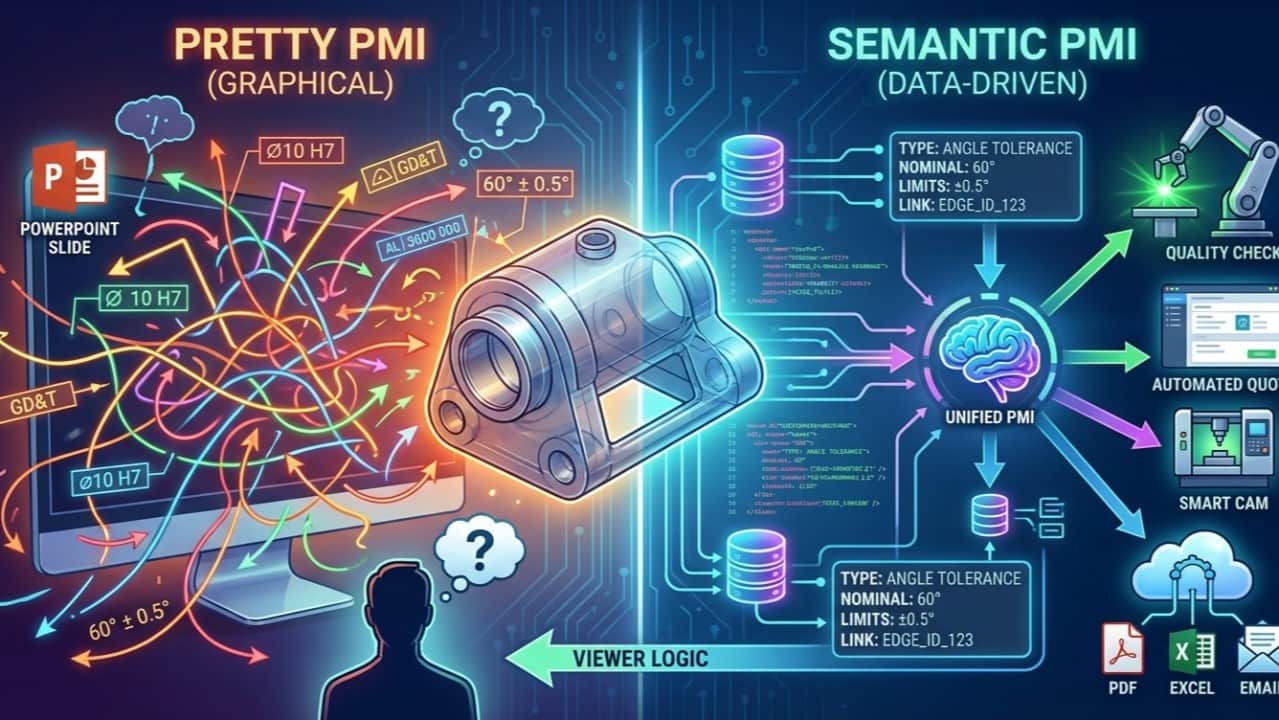
Graphical PMI: nice to look at, weak for automation
Graphical PMI is what you see:
- arrows and leader lines
- GD&T frames
- surface symbols
- text tags floating around the model
In many CAD systems, these are literally just drawn elements:
- The symbols are strokes and curves.
- The text is sometimes geometry, not even real text.
- The callouts are positioned visually, but the system doesn’t always “understand” them as structured data.
In that sense, graphical PMI is not fundamentally different from a 2D PDF drawing:
- lots of lines
- some symbols
- some notes
For a human, that’s fine. You can read “⌀10 H7” and know what to do.
For a computer, it’s just shapes on a screen.
You can build a viewer that shows graphical PMI on a 3D model and it looks slick. But from an automation and integration perspective, you haven’t solved much.
Semantic PMI: the PMI your systems can understand
Semantic PMI is something completely different.
It’s not about how the information looks. It’s about what it means in a data model.
Think of a tolerance like “60° ± 0.5°” on a chamfer. As semantic PMI, that is:
- a structured piece of data with:
- linked to specific geometric elements:
That information is stored in a way that:
- the computer can query it
- other systems can consume it
- rules and checks can run on top of it
- CAM, quality and planning can rely on it
You don’t “see” semantic PMI directly. To make it visible, you need viewer logic that takes the data model and renders symbols, arrows and text on the 3D model.
So the flow should be:
Semantic PMI → (viewer logic) → Graphical PMI
Not the other way around.
The illusion of progress: when “pretty PMI” replaces real progress
This distinction matters because many MBD discussions get stuck at the visual layer:
- “Our viewer can show GD&T in 3D.”
- “Look at all the PMI balloons around the model.”
- “We can toggle annotations on/off.”
That’s all graphical PMI.
Without a solid semantic PMI layer behind it, you still have:
- no reliable way to feed CAM with tolerances and specs
- no robust basis for automated checks and rules
- no way to cross-reference PMI with other data sources
- no consistent way to track PMI across revisions and documents
In other words: You’ve built a better PowerPoint, not a better factory.
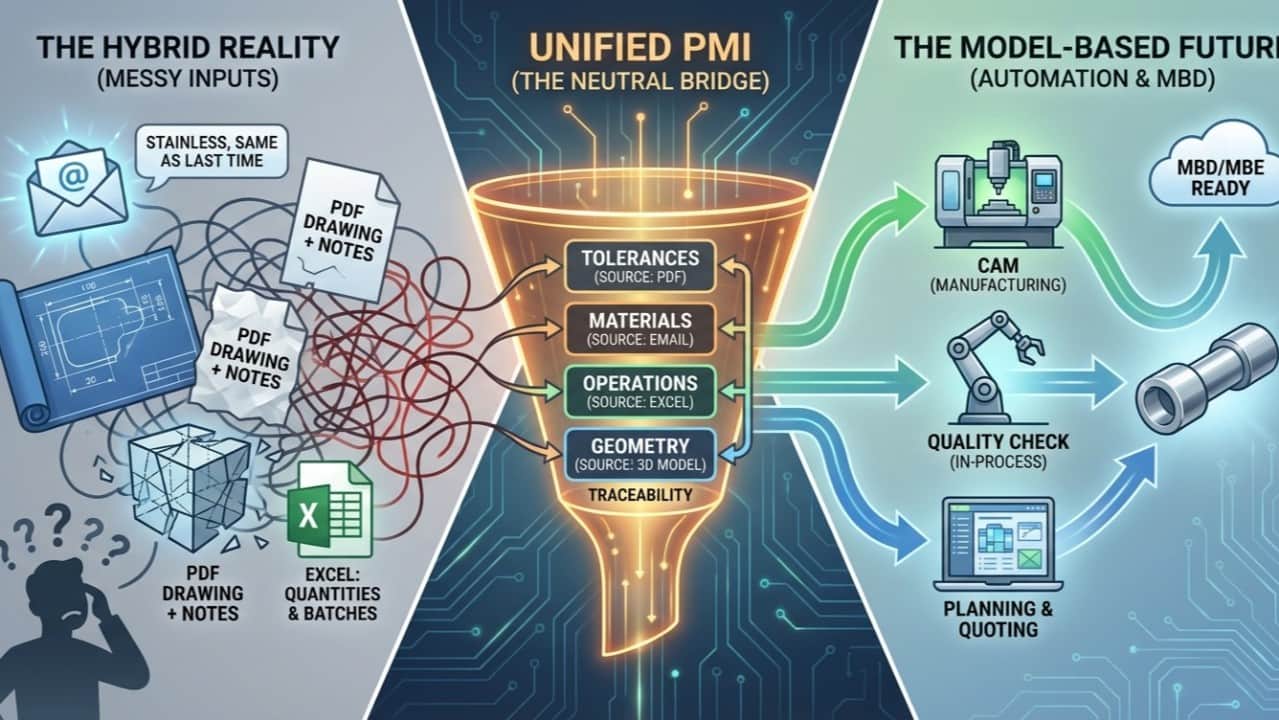
Unified PMI: collecting semantic PMI from everywhere
With Unified PMI, the focus is clear:
Don’t obsess over how PMI looks. Obsess over what it means, and where it comes from.
In the real world of metalworking companies, PMI doesn’t live in one neat place. It’s scattered across:
- 3D CAD models (sometimes with partial MBD)
- PDF drawings
- Excel sheets
- Emails and specifications
- Legacy systems
The job of Unified PMI is to:
- Extract semantic PMI from all these sources:
- Store it in a clean, structured data model:
- Maintain traceability:
- Link the PMI to geometry where relevant:
Once you have this semantic backbone, generating graphical PMI is “just” a presentation problem.
Why semantic PMI is the real engine of digitalisation
When PMI lives as semantic data instead of drawings, several things become possible:
1. Consistent interpretation
Systems no longer “guess” what a symbol means. They know exactly:
- which tolerance schema applies
- what units are used
- how to compare values
- how to interpret limits and fits
That consistency is the foundation for automation.
2. Automated decisions
With semantic PMI, your software can:
- select suitable machines and processes based on tolerances and finishes
- warn when requested specs conflict with capabilities
- calculate realistic times and costs
- suggest routing alternatives when constraints change
You can’t do that with a pretty picture of an annotation.
3. Robust traceability
Because PMI is stored with its source and relationships:
- you know which part of the model a tolerance applies to
- you can see which emails or documents introduced certain requirements
- you can track how specifications evolved across revisions
- That’s essential for quality, audits and change management.
4. Independence from file formats
By decoupling semantic PMI from a specific CAD or STEP flavour, you gain flexibility:
- you can integrate multiple CAD systems
- you can still move forward even when not everyone supports the same MBD standard
- you can adjust the viewer layer without breaking the data model
The Unified PMI model becomes your stable core in a moving ecosystem.
So what’s the role of graphical PMI?
Does this mean graphical PMI is useless? Not at all.
Humans still need:
- to visualise requirements
- to check context on the 3D model
- to review and discuss design and manufacturing implications
Graphical PMI is valuable as a user interface.
But it should be a view on top of semantic PMI, not the primary carrier of information.
If graphical PMI is just geometry with no semantics, then from a digitalisation perspective, it’s not much more than a nicer PDF.
What this means for metalworking companies
If you run or support a metalworking business, here’s the key takeaway:
If your PMI can’t be understood by a computer, you will always hit a ceiling in automation.
You can:
- invest in viewers and visual tools
- train people to read 3D PMI
- add more symbols and notes to your models
But until you have a semantic PMI layer that systems can reliably work with, things like:
- automatic routing
- rule-based quoting
- smart quality checks
- closed-loop feedback between design and manufacturing
…will remain mostly manual.
Unified PMI is our attempt to build that semantic layer in a practical way:
- using the CAD and drawings you already have
- pulling PMI from PDFs, Excel and emails
- keeping traceability to both geometry and source documents
- leaving room to generate graphical PMI wherever and however you like
Closing thought
In the end, the question is simple: Are you digitalising how PMI looks, or are you digitalising what PMI means?
If you’re serious about the latter, semantic PMI – and something like Unified PMI to bring it all together – is where the real leverage lies.
If you’d like to explore how much of your current PMI is purely graphical and what it would take to turn it into semantic PMI, I’m happy to dive into a concrete example from your own RFQs, models and drawings.