From Scripts to Signals: Why High-Mix, Low-Volume Factories Need Event-Driven Thinking
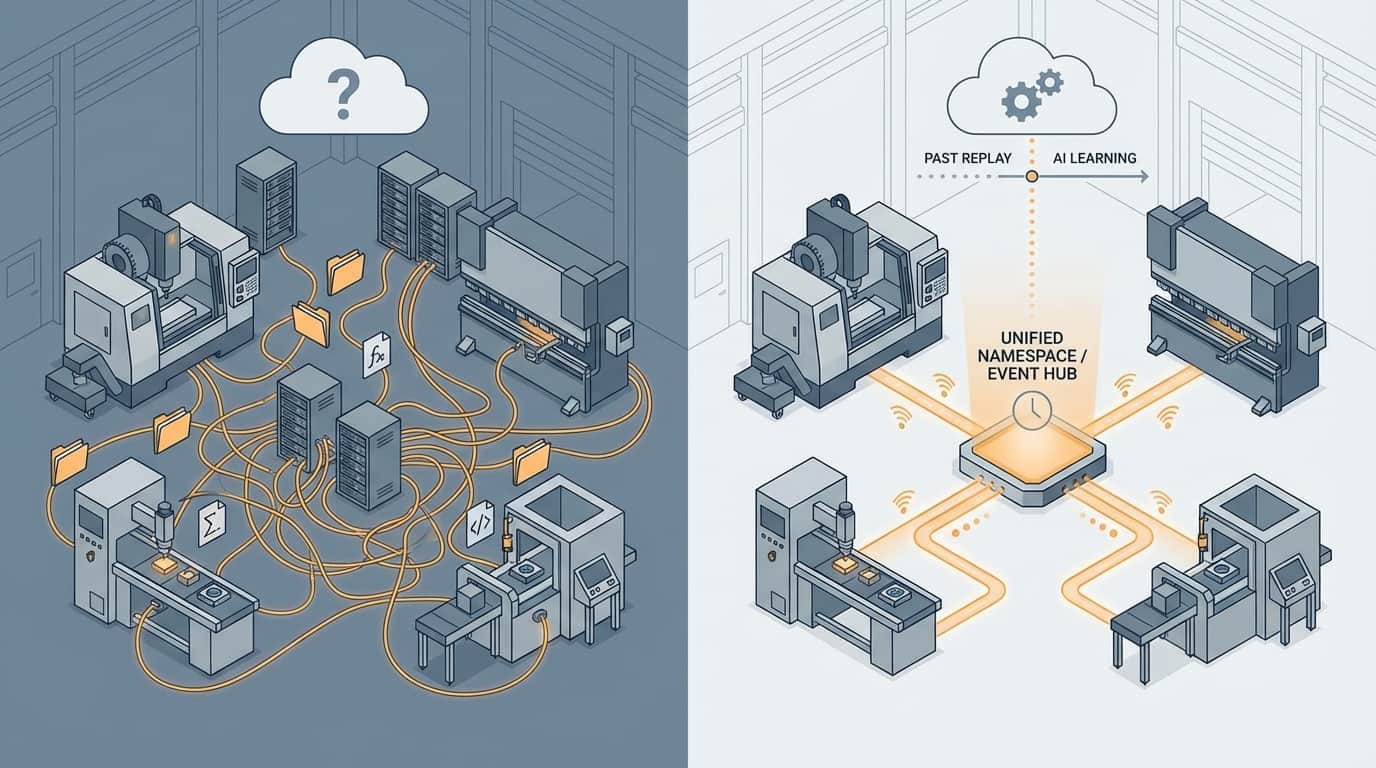
If you own a high-mix, low-volume manufacturing company, your factory is probably more digital than it was five years ago – but also more fragile.
ERP, CAD/CAM, MES, quality systems, Excel sheets, shared folders, a few custom scripts someone once “quickly” wrote… it all somehow works. Until it doesn’t.
And every time you add a new machine, a new customer portal, or a new integration, it feels like you’re adding one more card to an already wobbly house.
This isn’t just “an IT problem”. It’s a structural problem in how information flows through your factory.
In our live stream, I (Wim Dijkgraaf, founder & CEO of Quotation Factory) walked through the core of that problem – and what needs to change if you want a self-steering, learning production system that’s ready for AI.
This article is the written version of that story.
The Real Problem: Your Factory Runs on Hidden Logic
Most high-mix, low-volume factories grow their IT landscape organically:
- At some point you added an ERP.
- Later a MES or at least machine monitoring.
- CAM systems for different technologies.
- A CRM or quotation front-end.
- Quality data in yet another system.
- Excel files and folders living on a fileserver.
- Scripts and “small integrations” to keep it all in sync.
Every time two systems needed to talk, someone solved it pragmatically:
- A script that checks a folder every few minutes.
- A batch job that runs at night.
- A “file watcher” that reacts when a file appears, changes, or disappears.
As long as everything works perfectly, nobody complains.
But over time you end up with:
- Invisible dependencies – logic that only lives in scripts nobody dares to touch.
- No real observability – if something breaks, you don’t see where or why.
- Key-person risk – the person who wrote it has left or moved roles.
- Integration fear – every change feels risky, so you avoid improving the system.
In other words: digitally, you no longer really know what is happening in your factory – or why.
That’s a painful place to be if you want to automate more, connect to customers and suppliers, or apply AI in a serious way.
Messaging vs. Events: Two Different Questions
A lot of confusion starts with mixing up messaging and events.
They sound similar. Many vendors use the words interchangeably. But they solve different problems.
Messaging: “Please do this.”
You already know messaging from everyday life:
- A WhatsApp message
- An SMS
- An email
In system terms, a message is:
- Sent from system A to system B
- Has a clear recipient
- Has a clear intent: “Do something with this.”
Examples in a factory context:
- “Create this order.”
- “Recalculate the planning.”
- “Generate a quotation.”
- “Start this program on the machine.”
If nobody is listening to that message, that’s a problem. Something that should happen… doesn’t happen.
That’s why messaging infrastructure comes with queues, retry policies, error handling, dead letter queues, and so on. It’s about reliable execution of commands between known systems.
Messaging is great for:
- Well-defined workflows
- Controlled interactions
- Coordinating process steps
But… it also creates coupling:
- System A needs to know that system B exists.
- System A assumes B will understand and process the command.
- The two are tied together in logic and expectations.
In a world where your processes and partners change often, that coupling becomes a long-term liability.
Events: “This has happened.”
Events answer a different question.
An event is just a fact from the past:
- “Quotation was created.”
- “Order was released.”
- “Machine changed state from setup to production.”
- “Quality check failed.”
- “Part moved from operation 20 to 30.”
Key characteristics of events:
- They are facts – they already happened and never change.
- They are broadcast, not addressed to someone.
- The producer of the event doesn’t know who is listening.
- It’s perfectly fine if nobody listens (yet).
You generate events so that:
- You always know what happened, when, and in which context.
- You can store them in a historian.
- You can expose the current state of your factory via a unified namespace.
- Other systems – now or in the future – can subscribe and respond to those events.
With events, systems are decoupled:
- Publishers don’t know the subscribers.
- Subscribers don’t know the internal details of publishers.
- You can add or replace systems without breaking everything else.
For high-mix, low-volume factories – where exceptions are the rule, routes change, new product types are added and partners come and go – this loose coupling is crucial.
Why File Watchers Are Not “Event-Driven”
Many factories say:
“We already work event-driven. Our machines drop files and we have a script that picks them up when they change.”
Technically, yes, file changes are also “events”:
- File created
- File modified
- File deleted
But those are implementation details, not business events.
A raw file change does not tell you:
- What really happened in the business (“Order released?”, “Program finished?”, “Machine fault?”)
- Why it happened
- What the context was (which part, which customer, which operation)
File watchers are often a necessary workaround because many ERP, CAM, and MES systems are old and don’t offer modern integration options.
They are acceptable as a trigger.
But the important step is this:
Use the file watcher only to detect something,
then translate that into a real business event and publish that into your event architecture.
For example:
- File change → script detects it
- Script analyzes content → understands that “operation completed on machine X for order Y”
- Script publishes an event:
OperationCompleted(orderId, machineId, time, result, etc.)
Now you have something your whole digital factory can understand, replay, and build on.
Event-Based Architecture: Foundation for a Learning Factory
When you start thinking in business events, a few powerful capabilities become possible:
-
Full traceability
Every important change in your factory is recorded as an event. You can follow the exact path of a part, an order, or a customer request. -
Replay & simulation
Because events are stored in a historian, you can “play back” your factory in time.
That allows you to:- Compare behaviour then vs now
- Test new logic on historical data
- Simulate improvements without risking real orders
-
Unified view of reality
With a Unified Namespace (UNS), events feed the real-time “state” of your factory – machines, orders, queues, quality, etc. Any system can subscribe to this instead of integrating point-to-point with everyone else. -
AI-ready data
AI doesn’t just need data; it needs rich, contextual, time-based data:- What happened?
- In which sequence?
- Under which conditions?
- With which outcome?
Events provide exactly that structure and context, so you can train and improve AI models with real production behaviour instead of spreadsheet snapshots.
This is what we mean by a self-steering, learning production system:
A factory where software reacts to what actually happens, where history is available to learn from, and where new capabilities can be added without rewiring everything.
How Quotation Factory Uses Messaging *and* Events
Inside the Quotation Factory platform, we use an architecture called the Actor Model, implemented with Microsoft Orleans.
You can think of an actor as a kind of digital twin of something in your factory:
- A machine
- A CAM system
- An operator
- A quotation
- An order
- A workflow step
Each actor:
- Has an inbox for messages (commands).
- Processes those commands FIFO (first in, first out).
- Maintains its own state safely and consistently.
This has a few important consequences:
- We can model your factory almost one-to-one in software.
- We avoid complex multi-threading and caching problems.
- Performance and bottlenecks are easy to monitor.
- The system behaves predictably – especially important for critical flows like quoting and order handling in high-mix environments.
Within this actor world, we use messaging where it makes sense:
- “Generate a quotation for this inquiry.”
- “Run a manufacturability check in CAM.”
- “Sync this order to ERP.”
These are commands – someone must do something.
At the same time, actors publish events:
- “QuotationCreated”
- “ManufacturabilityCheckFailed”
- “OrderReleased”
- “MachineProgrammed”
Those events go on event streams, where any interested component can subscribe, now or in the future.
This combination gives you:
- Coordination where needed (messaging for controlled processes)
- Freedom where possible (events for decoupled integrations)
- A future-proof backbone for your digital factory
Average vs. Top-Performing Factories
The difference in approach is visible in how companies build their digital infrastructure.
Average factories:
- Rely on scripts, shared folders, and file watchers.
- Add “just one more” integration every time a new need arises.
- Have logic scattered across machines, desktops, and old codebases.
- Struggle to understand where data comes from and why something happened.
- Treat AI as something to “bolt on” later.
Top-performing high-mix, low-volume factories:
- Make business events explicit (“quotation created”, “operation completed”, “machine stopped”).
- Use a Unified Namespace and event brokers for decoupled integrations.
- Use messaging only where a clear command and responsibility exist.
- Store events in a historian to replay, analyse, and improve processes.
- See AI as a natural next layer on top of a clean, event-rich foundation.
Quotation Factory is built for these top-performing teams – and for those ready to become one of them. Our focus is not just on faster, more reliable quoting, but on turning your data and processes into a long-term competitive advantage in the “infinite game” of manufacturing.
A Simple Rule of Thumb for Your Next Digital Decision
You don’t have to redesign your entire architecture tomorrow.
But each time you touch an integration, ask yourself one simple question:
“Am I asking someone to do something – or am I telling the world that something has happened?”
-
If you expect a system to perform an action:
→ Use messaging (a command with a clear recipient and responsibility). -
If you just want to announce what happened so others can react if they want:
→ Use an event (a fact published on an event stream, stored in a historian, exposed via UNS).
And if you still heavily depend on file watchers, scripts, and nightly batch jobs:
- Identify which real business events they are implicitly trying to handle.
- Make those events explicit and first-class citizens in your architecture.
- Use the file watcher only as a technical detail – never as your main “integration strategy”.
Where to Go From Here
If you recognise your factory in this story – lots of scripts, growing digital complexity, and increasing pressure to “do something with AI” – you’re not alone.
The good news: you don’t need a big-bang ERP replacement to fix it.
You do need to start thinking in events, messaging, and a decoupled architecture that can keep up with the reality of high-mix, low-volume production.
If you’d like to see how we apply this in practice – from quotation automation to shop-floor integration – and what an event-driven architecture could look like on top of your existing systems, feel free to reach out.
We’re happy to walk through your current landscape and help you make integration choices that won’t hurt five years from now.